ERP & CRM Development
Custom ERP and CRM systems for businesses that have outgrown spreadsheets and off-the-shelf tools that almost fit.
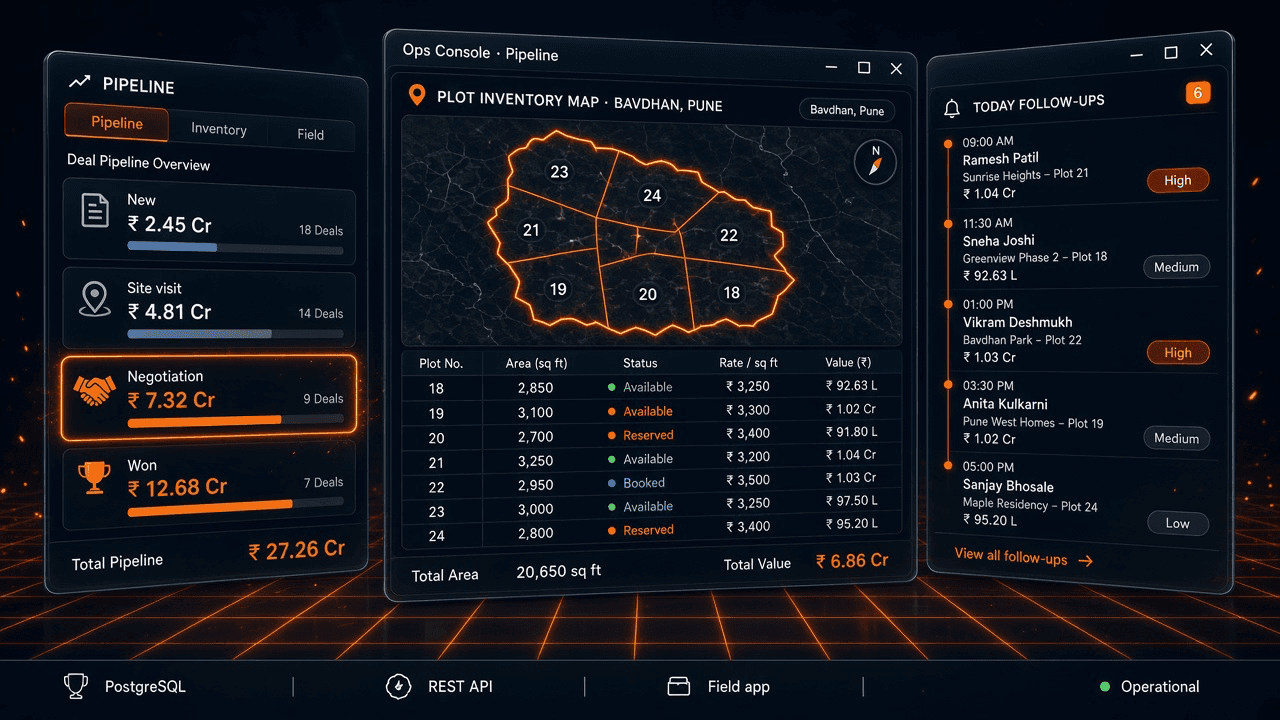
Spreadsheets and off-the-shelf CRMs are genuinely the right tool for a lot of businesses — right up until the business's actual process stops fitting either one. A real-estate developer's plot inventory and site-visit logistics, a manufacturer's multi-stage procurement approval, a field-sales team's territory routing — none of that maps cleanly onto a generic pipeline-and-contacts tool.
When the tool doesn't fit, the workaround becomes the real system: a shadow spreadsheet nobody officially owns, a WhatsApp group doing the coordination the CRM was supposed to do, historical data trapped in whichever laptop last touched it.
The cost isn't just inefficiency — it's risk. Decisions get made on stale numbers, handoffs lose information, and the business's actual operational knowledge lives in people's heads instead of a system that survives them leaving.
Algotrax builds ERP and CRM systems around the process as it actually runs, not the process a generic tool assumes you have.
What's included
Process mapping before any schema gets designed — the system fits the business, not the reverse
Custom CRM: pipeline, lead routing, activity tracking, reporting
Custom ERP modules: inventory, procurement, field operations, finance workflows
Field-team and admin apps that talk to the same backend as the core system
Migration from spreadsheets/legacy tools without losing historical data
How it actually runs
Process mapping
Time spent understanding how work actually moves through the business today — the exceptions and workarounds included — before any schema gets designed.
Data model & schema design
The structure that will hold years of operational history, designed to match the real process, not a generic CRM's default objects.
Core module build
Pipeline, inventory, procurement, or field-ops modules built and shipped incrementally, so the team is working in the new system well before every feature exists.
Migration
Historical data moved from spreadsheets or legacy tools without losing the record — a common failure point in DIY migrations.
Field & admin app build
Mobile or field-facing tools that talk to the same backend as the core system, so there's one source of truth, not two systems quietly disagreeing.
Rollout & training
A real rollout plan — the best system in the world fails if the team reverts to the old spreadsheet out of habit.
Built with
What most agencies get wrong here
Designing the schema before mapping the process.
A data model built on assumptions instead of how work actually happens gets rebuilt within six months, at real cost.
Big-bang launches with no fallback.
Replacing a spreadsheet system overnight, with no parallel run, is how a business loses a week of operational visibility to a bug.
Ignoring the field team's actual constraints.
A system designed at a desk that doesn't account for patchy connectivity or a phone-only field team gets abandoned in practice within weeks.
Treating training as an afterthought.
The system fails if people don't use it; rollout and training is part of the build, not a slide deck at the end.
How the engagement works
Process mapping is scoped and priced as its own short phase first — usually the highest-leverage week of the whole engagement, since it's what makes the rest of the build accurate.
The system itself is typically built in module-sized phases (pipeline first, then inventory, then field apps, for example) so the business is getting value before the entire system is finished, not waiting months for one big-bang launch.
Because these systems keep evolving with the business, most clients move to an ongoing arrangement after initial launch rather than a single fixed-scope project that ends at go-live.
Once the system is live, the shadow spreadsheet disappears — not because anyone was told to stop using it, but because the real system finally fits how the work actually happens.
Getting started is the process-mapping phase — a short, focused engagement on its own, valuable even if the fuller build happens later or elsewhere.
Tell us where erp & crm development fits in, and we'll reply within a day.
- A real person reads this, not a queue
- No discovery call required to get a straight answer
- Tell us to go away and we will — no drip sequence
Questions worth asking first
Off-the-shelf tools are right for a lot of teams. Custom makes sense once your process doesn't fit the tool's assumptions — Dholera Pratham's admin CMS and field-sales app exist because real-estate deal flow, plot inventory, and site-visit logistics didn't map cleanly onto a generic CRM.